Week of 1/12 - 1/17
- vvaldezmelgar
- Jan 17, 2025
- 3 min read
This week has been very productive for the Hunter's Journal. I was finally able to get the light code working; I just had to rebuild it all from scratch. I also put in the colors I wanted the LEDS to be to correspond to their OLED display counterparts. That took all of Monday and Tuesday to do.
The part that took the most time was adding switch states to the OLED code (I built the two codes separately, so I focused on each part and made sure they worked).
Light Code (Holds all the Light+Button Code)
#include <Adafruit_NeoPixel.h>
#ifdef __AVR__
#include <avr/power.h>  // Required for 16 MHz Adafruit Trinket
#endif

#define PIN 6          //The pin connected to the NeoPixel
#define BUTTONPIN 7    //The pin connected to the button
#define NUMPIXELS 8    // Amount of NeoPixel attached to the Strip
#define STATE_BASE 0   //The Starting state of the NeoPixel
#define STATE_ONE 1    //The First state
#define STATE_TWO 2    //The Second state
#define STATE_THREE 3  //The Third state
#define DELAYVAL 300   // Time (in milliseconds) to pause between pixels
#define MODE 4 //The Amount of different cases and modes
int PRESSCOUNTER = 0;  //The amount of time the button is pressed
Adafruit_NeoPixel pixels(NUMPIXELS, PIN, NEO_GRB + NEO_KHZ800);
void setup() {
  pinMode(BUTTONPIN, INPUT);
  pinMode(PIN, OUTPUT);
  pixels.begin();  // INITIALIZE NeoPixel strip object (REQUIRED)
  Serial.begin(9600);
}

void loop() {
  pixels.clear();  // Set all pixel colors to 'off'

  // to the count of pixels minus one.
  if (digitalRead(7) == HIGH) {
    PRESSCOUNTER++;
    delay(DELAYVAL);
  }
  Serial.println(PRESSCOUNTER);


  if (PRESSCOUNTER > MODE) {
    PRESSCOUNTER = 0;
  }
  switch (PRESSCOUNTER) {  //choose what to display based on the PRESSCOUNTER value
    case STATE_BASE:
      // {
      for (int i = 0; i < NUMPIXELS; i++) {  // For each pixel...
        //from 0,0,0 up to 255,255,255
        pixels.setPixelColor(i, pixels.Color(13, 228, 20));
        pixels.show();  // Send the updated pixel colors to the hardware.
      }
      break;

    case STATE_ONE:
      for (int i = 0; i < NUMPIXELS; i++) {
        pixels.setPixelColor(i, pixels.Color(0, 71, 71));
        pixels.show();
      }
      break;

    case STATE_TWO:
      for (int i = 0; i < NUMPIXELS; i++) {
        pixels.setPixelColor(i, pixels.Color(191, 64, 191));
        pixels.show();
      }
      break;

    case STATE_THREE:
      for (int i = 0; i < NUMPIXELS; i++) {
        pixels.setPixelColor(i, pixels.Color(248, 131, 121));
        pixels.show();
      }
      break;
  }
}
The OLED code is much more tricky than the LED code because there's a lot more going on. All but the starting state of the switch states work, which is very annoying. There's a for loop that loops forever but when I get rid of that for-loop; the animated code just doesn't work. It just doesn't do anything! I need to figure out what to replace the animated display with and I spent the rest of Thursday, but I'm settled on just another shape repenting over and over like the other code I have in the other OLED states.
Now, I have to merge the two different codes together and double-check that they work. I also tried to move the codes to GitHub Desktop, but it seems to be broken a bit on my computer(it keeps giving me strange error messages and doesn't allow anything to move to the GitHub website). I will see if I can fix that, but I'm mostly focused on getting this code done and moving on to the next stage of Hunter's project.
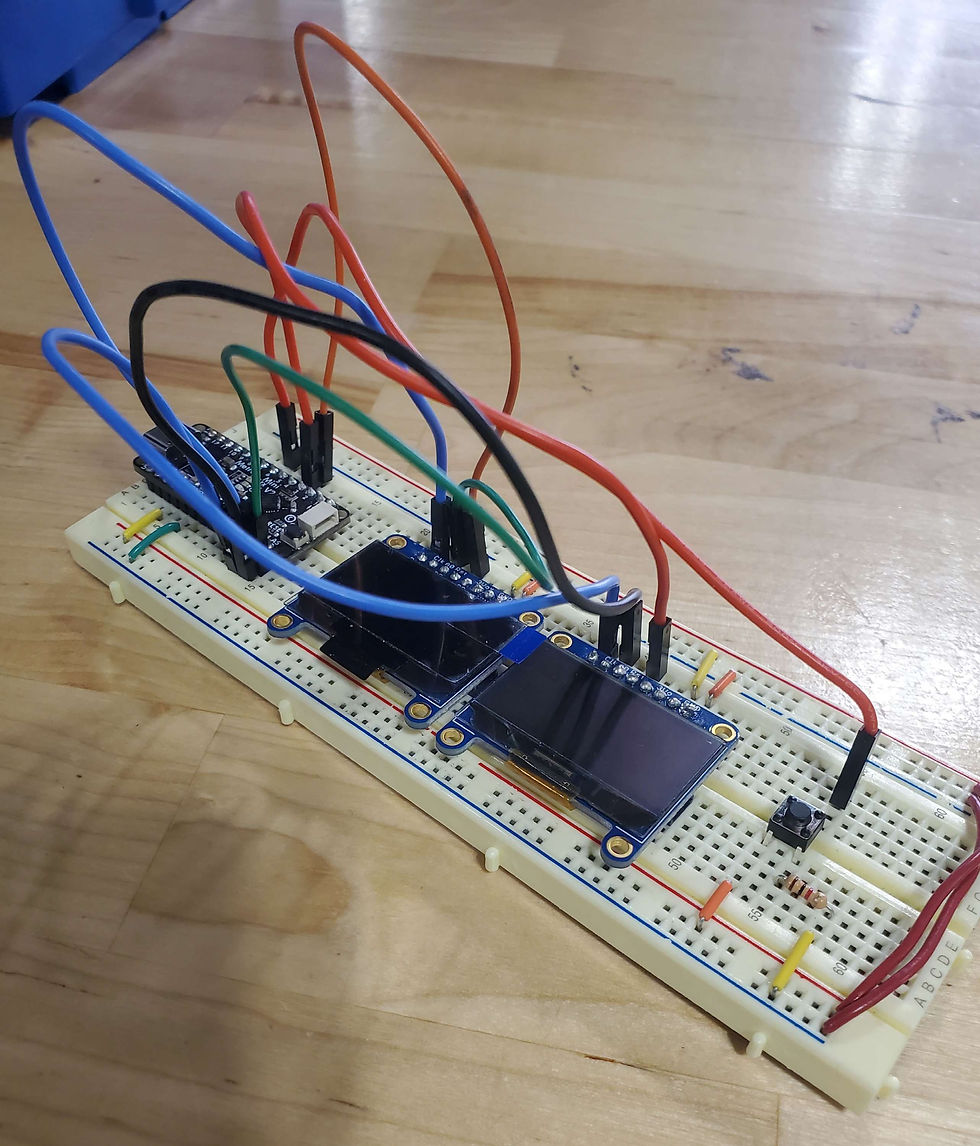
(My current breadboard/circuit. I need to turn this into a schematic)
Comments